


There are five different pitching interfaces in MLB The Show 25; it’s been that way for a few years now. These five seem to work, so San Diego Studios has seen no reason to add or edit any interfaces. It all seems to be roughly the same as last year’s title.
There is Classic, Pulse, Meter, Pure Analog, and Pinpoint. Pinpoint is the default pitching setting and favorite amongst online/competitive players. Pure Analog is the watered-down version of Pinpoint for players who are too intimidated by the complexity of that interface.
As counterintuitive as it sounds, Meter is the “classic” pitching interface that started as the default pitching interface for the franchise. The Classic interface is newer than Meter, but it’s the most straightforward interface in the game. Pulse is the final interface, and it’s slightly more complicated than Classic but still easier.


Operation Sports App
Your ultimate companion for sports gaming. Access in-depth coverage, thoughtful discussion, and a community built around the games—and sports—you love.
Your ultimate sports gaming companion.
All Pitching Interfaces Compared In MLB The Show 25
Classic
Degree of Difficulty: 1
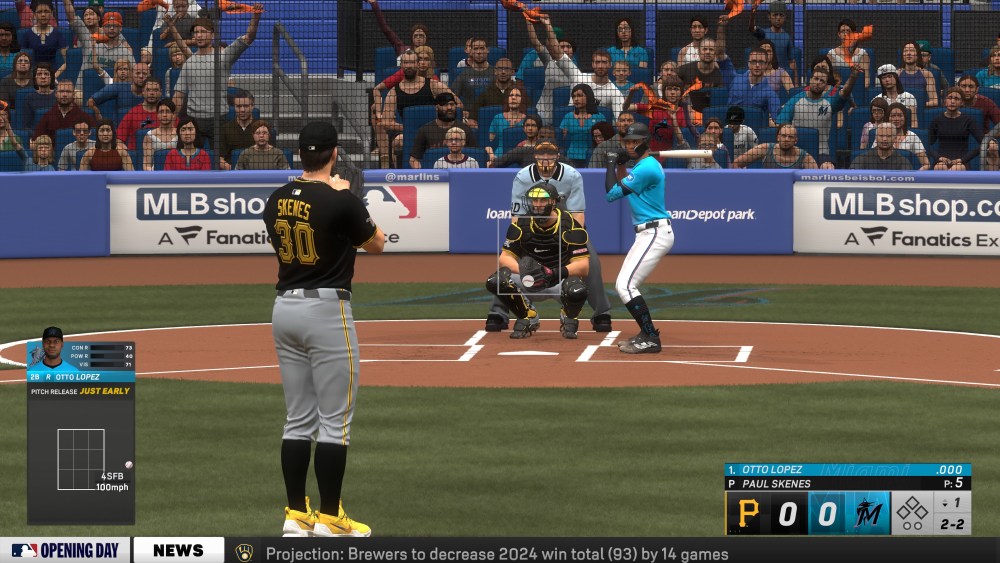
What Is It?
The Classic interface has you select a pitch, aim where you want it to go, and then deliver it to the plate with the push of a button. You can hold down the button longer for more velocity/break while sacrificing accuracy, or tap it instead to prioritize accuracy. Whether or not it hits your target, though, is determined almost entirely by the attributes of your pitcher (and maybe a little RNG).
Pros
It’s the easiest pitching interface to perform, perfect for extremely casual (perhaps a little uncoordinated) players; you only have to push a button. This interface also ensures the most realistic outcomes regarding control on every pitch because attributes are the only factor. That means you can expect to concede a healthy number of walks, especially with pitchers who habitually can’t find the strike zone in real life. Which can be frustrating, but it’s also realistic for the authentic MLB.
Cons
It’s boring and too simple for you to stay engaged with the game. It can feel more like you’re watching a game than being involved when you’re on the mound and repeatedly pushing a button. It’s the worst possible option in online play because of how little influence you’ll have in hitting the corners consistently and getting guys to chase.
Best Mode
Franchise mode, for die-hard stat nerds who want their pitchers to have the most true-to-life stats possible.
Pulse
Degree of Difficulty: 3

What Is It?
A timing-based method where the goal is to hit the button when the rapidly shrinking circle is at its smallest if you want your pitch to be as accurate as possible.
Pros
It shouldn’t take too long to get accustomed to using the interface and be able to consistently nail the precise timing required. The one click involved to deliver a pitch is only a third (check my math) of the number of clicks involved compared to using meter, but it still requires enough skill to keep you focused and involved in the game in a meaningful way.
Cons
The common complaint about Pulse is that, even if you’re adept with the interface, pitches can still tend not to go exactly where you want. As a habitual Pulse pitcher myself, I feel as though this is slightly less notable this year, although there are, of course, some pitches that float out of the pulse zone (especially when using a pitcher with bad control).
Best Mode
Diamond Dynasty, offline only, or if it’s your preferred interface.
Meter
Degree of Difficulty: 5

What Is It?
The OG pitching interface of MLB The Show is a 3-click method that starts with having you input power and then tasks you with nailing the timing if you hope to be accurate with your arsenal of pitches. This was the default method to pitch before analog, pulse, and pinpoint pitching.
Pros
There’s a reason it’s been around for so long now, and that’s how well its rhythm approach can mimic a pitcher finding a groove on the mound. The way the accuracy window increases when a pitcher is really dealing is a nice representation of a pitcher getting into the zone. It’s also a lot more interactive than the first two interfaces. Your ability to hit the perfect timing impacts not only the location but also the strength of the pitch.
Cons
For anyone who has played the MLB The Show series since its early days, they’re bound to be at least a little tired of using the interface at this point. It can be deceptively challenging as well to continuously hit your desired mark with that final click, particularly when it shrinks down to just a sliver for a struggling pitcher.
Best Mode
Franchise mode, for those who want a decent level of realism but also would like to retain at least some amount of input into where their pitches end up.
Pure Analog
Degree of Difficulty: 5

What Is it?
As you’d expect with its name, the Pure Analog interface involves moving the analog stick back to begin your pitch and then forward at both the right moment and angle to hit your desired location. This used to be the default method before “Pinpoint” became the new thing.
Pros
Combining timing with stick skills, the risk/reward when using analog is fairly decent and should lead to good command if you don’t mess anything up within the interface. It’s less involved than Pinpoint pitching because you don’t need to worry about tracing various shapes for different pitches, like you do with pinpoint.
Cons
Because you’re not needing to do as much on the sticks as you do with pinpoint, the results, as you might expect, are pitches that are just slightly less accurate based on your input. There’s a good argument for jumping in and learning to use pinpoint pitching if you prefer the analog stick, especially if you will be playing online.
Best Mode
Diamond Dynasty offline if it’s your preferred interface but only take it online if you’re really good at it.
Pinpoint
Degree of Difficulty: 9

What Is It?
Pinpoint pitching involves maneuvering the analog stick in different ways for each type of pitch, influencing a pitch’s ultimate location based on the timing and precision of your maneuvering.
Pros
Pinpoint likely gives you the best chance at putting a pitch where you want it, provided you can regularly produce perfect feedback from your movements. It’s also incredibly involved, constantly keeping you on your toes with replicating the required intricate stick maneuvers of those like the dreaded circle changeup.
Cons
It can take a while to get the hang of Pinpoint pitching, and until you’re familiar with what’s required from the interface, it can be frustrating when you continuously hang meatballs over the plate or lead a parade of walked batters. It’s tough if your stick skills aren’t seasoned by years of FPS games that have strengthened your thumbs.
Best Mode
Diamond Dynasty online.
Once you identify your favorite Pitching interface, you can test how your skills match up against the best pitches in MLB The Show 25.




Published: Apr 24, 2025 09:30 am